

- Model Access decides which Model Routes, and routing policies, each person may use.
- At launch, Bridge fills each of the client’s model choices with an allowed route, usually the newest. A session can call only the models the person is allowed.
- LLM Management → Model Routes shows which route fills which choice, and lets you pin a different one.
If your organization has Bridge govern MCP only, models run on each person’s own Claude or OpenAI sign-in and this page doesn’t apply.
What each client shows
Each model choice a client offers is a slot. Claude Code has Default, Opus, Sonnet, Haiku, and Fable slots, plus an Advisor; Codex and Kilo have one, Default.
A route whose providers are all unhealthy is left out until the next launch or renewal. If your organization requires a routing policy, only routing policies are usable, so they fill every slot.
Claude subscription routes
A Claude subscription route bills each person’s own Claude plan; its provider is Anthropic OAuth, and the admin UI calls it a “Claude login”. Anthropic serves a subscription only for requests from Claude Code, so: Give each Claude route the subscription first and an API-key, Bedrock, Vertex, or Foundry target second. Requests Anthropic would refuse on the subscription then go straight to the second target. A subscription-only route works for Claude Code and for Claude Desktop conversations, but Codex and Kilo can’t use it, and Claude Desktop’s connection check and chat titles fail unless its Haiku route points at Haiku 4.5. When someone is allowed a subscription route, Claude Code must be installed on their laptop and signed in to their Claude account before Claude Code or Claude Desktop launches. Bridge offers to install it.What each client can do on a Claude subscription
What each client can do on a Claude subscription
Create Claude routes
On the Claude Code tab of Client settings, Create Claude routes (shown when you have an Anthropic subscription provider) does the setup above for you. It creates Model Routes for your Anthropic provider’s current Claude models, first enabling the newest model in any family that has none enabled, and gives each subscription route a fallback on your first API-key, Bedrock, Vertex, or Foundry provider that carries the same model. Existing Claude routes that use only a subscription get the same fallback, and a switched-off Claude route is switched back on. Nothing else changes. When it finishes, it lists any routes it couldn’t give a fallback, under These routes need a fallback target, and any Model Access allowlists that would still block the new routes, with Add to these policies to fix those in one step.Check which route fills what
In LLM Management → Model Routes, badges under each route’s name, such as Claude Code · Opus, show which Claude Code slots it fills. Codex and Kilo Code get a badge only on a route you’ve pinned. Badges describe someone whose Model Access allows every route. To see what one person gets, use Preview as user at the bottom of each Client settings tab.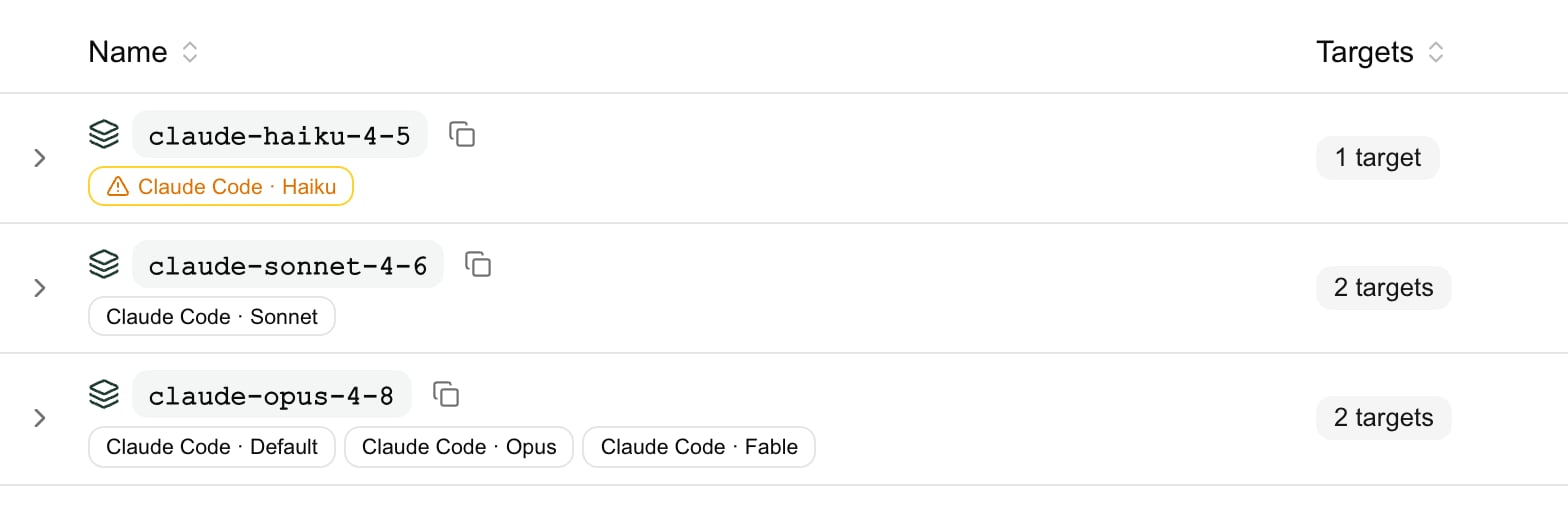
barndoor: models - Default: claude-opus-5-5 (1M) | Opus: claude-opus-5-5 (1M) | Sonnet: claude-sonnet-5-5 (1M) | ….
Pin a route to a slot
The automatic picks suit most organizations. To choose a route yourself, open its menu in Model Routes and select Use for Claude Code (then Default, Opus, Sonnet, Haiku, or Fable), Use as Codex default, or Use as Kilo Code default. The confirmation names the route that fills the slot now.- A pin applies only to people whose Model Access allows the route, so it never gives anyone a model they weren’t already allowed. Everyone else keeps the automatic pick.
- Codex and Kilo can’t be pinned to a route that uses only Claude subscriptions.
- A pinned slot shows a pin on the route’s badge. A pin that isn’t applying, for example because the route was disabled, shows dimmed with the reason in its tooltip.
- To remove a pin, expand the route and select Remove next to it.
How each client picks
You don’t need these rules to set Bridge up. They explain the badges, and what to change when a client starts on a route you didn’t expect.Claude Desktop
Claude Desktop starts on Claude Code’s Default slot, so a Claude Code Default pin applies to it too. Routes to non-Claude models aren’t shown; people who need them use Codex or Kilo. Name routes<purpose>-<model ID> for the cleanest picker: eng-claude-opus-5-5 pointing at claude-opus-5-5 shows as Claude Opus 5.5 (eng).
How the picker labels routes
How the picker labels routes
The label is the route’s model plus its purpose, which is whatever the route name holds around the model ID. A route named exactly after its model shows the model alone, and a name that doesn’t contain the model ID becomes the purpose whole. When two routes would get the same label, they show their route names instead. Routes that support it also get a 1M-context option.
Claude Code
Each slot gets the pinned route if there is one, and otherwise the newest allowed route of that family.Slot rules in detail
Slot rules in detail
- A routing policy never fills Opus, Sonnet, Haiku, or Fable by itself. If a policy is the Default, a slot with no route of its own takes the Default.
- Haiku can be left unset. When no Haiku route is allowed and the Default route’s first target is a Claude subscription to a model other than Haiku, Haiku stays unset, because Anthropic refuses Claude’s background tasks on Opus and Sonnet subscription requests. The launch prints a
barndoor: warning:line saying so. A fallback target doesn’t help, since only the first target counts. Allow or pin a Haiku route to fill it. - Ties: when two routes carry the same model generation, a route with at least one API-key, Bedrock, or Vertex target wins over a route that uses only Claude subscriptions. After that, a route whose primary target is the Claude subscription wins.
- 1M context is set for you. When every model on a route is a known 1M-context Claude model, Claude Code compacts at 1M tokens; otherwise at 200k. A routing policy gets 1M when its most capable target does.
- On a route to a non-Claude model, extended thinking and Anthropic’s built-in tools, such as web search, aren’t available.
Codex
Codex lists every allowed route or routing policy, whatever it’s called. A route to a GPT model Codex knows behaves exactly like that model; any other route still works, with fewer Codex features. If any allowed route bills a ChatGPT subscription, the person must be signed in to ChatGPT before launching.Starting route and features in detail
Starting route and features in detail
Codex starts on the first of these that the person is allowed:
- the route you pinned as Codex’s default;
- a route named after a Codex model, such as
gpt-6.1-sol; - the newest route to a GPT model;
- the first route Codex can use by name, preferring an API key over a ChatGPT sign-in;
- the first routing policy by name.
Kilo
Kilo lists every allowed route except those that use only Claude subscriptions, including routes on a ChatGPT subscription.Starting route in detail
Starting route in detail
Kilo starts on the first of these that applies:
- the route you pinned as Kilo’s default;
- the newest route named after a Codex model, such as
gpt-6.1-sol; - the newest Claude route Kilo can use;
- the first usable route by name, preferring routes with an API-key, Bedrock, or Vertex target;
- the first allowed routing policy by name.
Web search
Claude’s built-in web search runs only on routes to Anthropic or Google Vertex AI. On other routes, such as Amazon Bedrock or a route to a non-Claude model, the turn completes without searching. Each search is added to the request’s cost on the LLM Usage Dashboard, at Anthropic’s list price of $0.01 per search; requests on a Claude subscription route record no cost.When no model fits
If a person is allowed no route the client can use, the launch is refused and appears under Recent failed launches. Codex and Kilo are refused only when every allowed route uses only Claude subscriptions and there’s no routing policy. The fix is a Model Access change, not a client settings change.The messages people see
The messages people see
When changes take effect
- Model choices are fixed at launch. A running session keeps its models until the person relaunches the client.
- Removing access is quick. Model Access is checked on every request, so a route you remove from someone’s access stops working within about five minutes.
- Adding access waits for renewal. A running session picks up a newly allowed route when its credential renews, about once an hour, or when the person relaunches.
- If nothing the person is allowed fits the client any more, the next renewal fails and requests in the running session fail with
barndoor: governed session renewal failed — check network and retry(in Claude Desktop,governed session renewal failed).