

View your profiles
Navigate to Data Control Center → Protection Profiles.
- Profile name — the display name you gave it
- Type — the underlying detector (Regex Detector, Custom Regex, Classifier, External Provider)
- Supported Actions — the enforcement actions available to policies that use this profile (Block, Redact, Mask, Tokenize, Alert Only, Bypass)
Create a profile
-
Click Add Protection Profile in the top-right corner of the Protection Profiles tab.
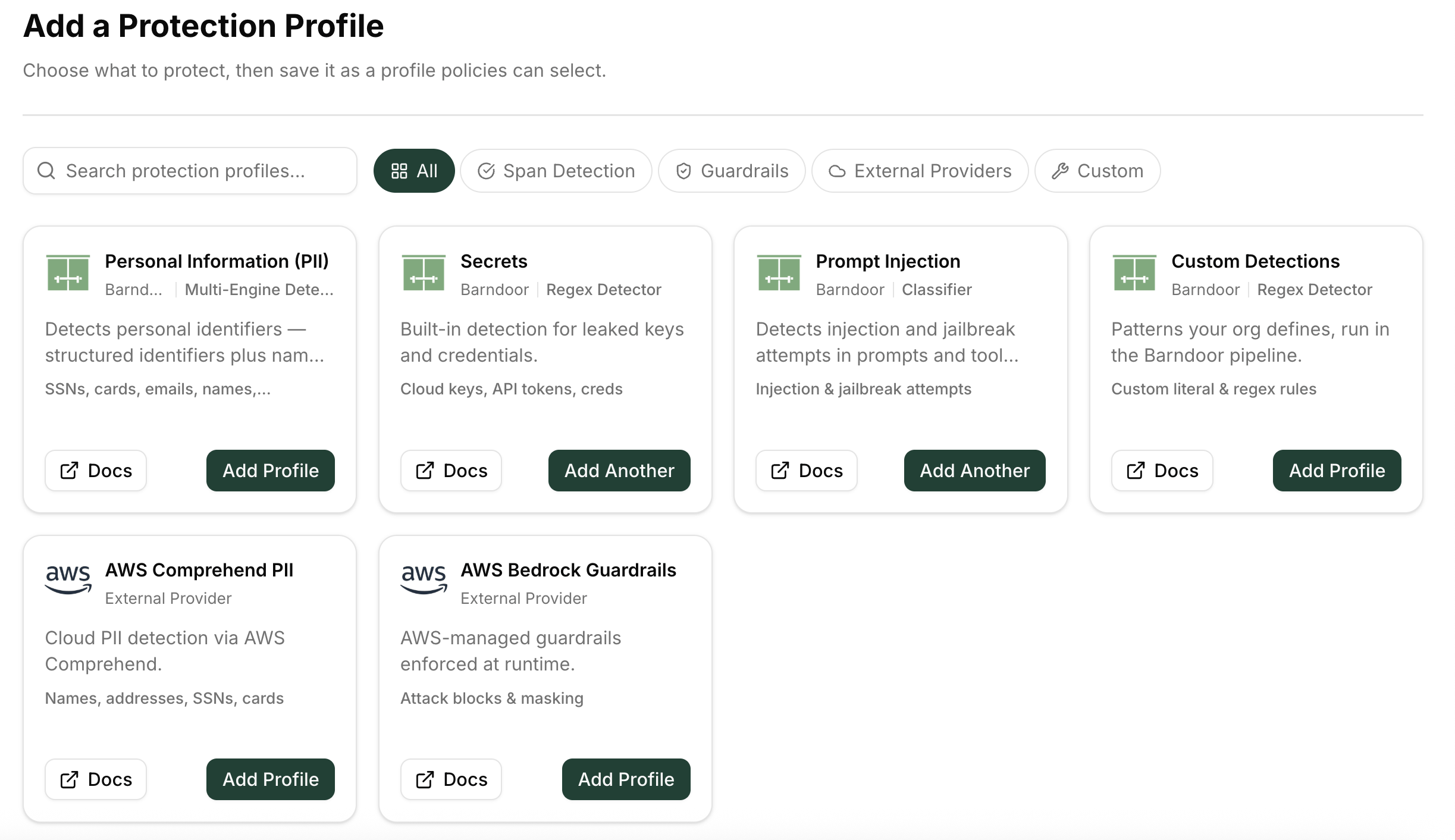
The catalog opens:
-
Choose a profile type:
If a built-in type already exists in your org, the button reads Add Another. You can have multiple profiles of the same type with different detection-type selections.
- On the configuration screen, give the profile a descriptive name (for example, “Regulated customer identifiers — revenue ops”). Select which detection types within the category to enable.
- Click Save to create the profile.
Edit a profile
- On the Protection Profiles dashboard, find the profile you want to change.
- Click the ⋮ menu on the right side of the row and select Edit.
- Update the name or the enabled detection types.
- Save the changes.
Delete a profile
- On the Protection Profiles dashboard, click ⋮ → Delete on the profile row.
- A confirmation modal lists any active policies that reference this profile. Deleting the profile removes it from those policies; policies that lose all profiles are archived automatically.
- Confirm the deletion.
Deleting a profile does not remove historical detection events that used it. Past audit records are preserved.
Create a custom detection type
Custom detection types let you define regex or literal patterns for data formats unique to your organization — for example, an internal customer ID with a known prefix.- On the Protection Profiles dashboard, click New custom type.
- Enter a name, description, and one or more patterns:
- Regex — a regular expression (e.g.,
cust_[0-9]{8}) - Literal — an exact string match
- Regex — a regular expression (e.g.,
- Save. The custom type becomes available when configuring any profile of type Custom Detections.
Test that detections work
Use the Policy Test Workbench to verify that a profile detects the data it should before attaching it to an enforcing policy.- Navigate to Data Control Center → Test.
- Paste a sample payload containing the data you expect the profile to detect.
- Select the runtime stage and choose the protection profiles to run.
- Review the findings: which detection types fired, at what spans, and with what confidence.