

Barndoor Bridge is in Early Access. These pages are not listed in the navigation. Overview:
/how-tos/barndoor-bridge/overview · Using Bridge: /how-tos/barndoor-bridge/using-bridge · Install with MDM: /how-tos/barndoor-bridge/install-with-mdmWhat it is
Barndoor Bridge is the endpoint half of the Barndoor platform: software on a developer’s Mac that puts Claude coding sessions under the organization’s governance. The platform’s admin UI, LLM Gateway, policy service, data protection, and audit are the cloud half; Bridge is how that control reaches the laptop. It ships as one signed, notarized macOS installer,Barndoor.app, containing two parts:
- The Bridge app. A window and menu-bar item that handles sign-in, keeps configuration synced, and launches a governed Claude Desktop with one click. It appears as Barndoor in Applications, the Dock, and the menu bar.
- The
barndoorCLI. The governed launcher and local tool gateway underneath the app. Developers can also use it directly from a terminal.
What it does
Without Bridge, Claude Desktop talks to Anthropic and to whatever MCP servers the user configured locally. Barndoor never sees the session, cannot apply policy, and cannot route traffic through the organization’s LLM Gateway. With Bridge:1
Sign in
The user signs into Barndoor from the app. Sign-in opens the browser and completes with the organization’s identity provider.
2
Sync
Bridge pulls the organization’s list of connected MCP servers onto the laptop at sign-in, then about every five minutes while signed in. It also caches a signed policy bundle, used only as a fallback for local tool calls if the platform cannot be reached.
3
Launch Claude Desktop
One click starts Claude Desktop in a Barndoor-managed profile. Model traffic goes through the organization’s LLM Gateway. Calls to the organization’s remote MCP servers go through the Barndoor platform, where policy, data protection, confirmations, and audit apply. Calls to the local tools built into Bridge are checked against the platform’s policy service at call time before they run on the laptop.
Model traffic
When Claude runs through Bridge, model calls go to a loopback credential broker on the laptop, which forwards only to the organization’s Barndoor LLM Gateway. There:- the session’s launch profile decides which Model Route each Claude request takes, and so which models Claude may use;
- policy and data protection run on every request and response;
- every call is audited with the user, client, and agent identity attached.
Tool traffic
Bridge runs a local MCP gateway that Claude sees as its only tool server. Agents interact through a small set of meta-tools (search tools, describe tools, execute a tool, list servers, confirm an action, help). Behind that surface Bridge exposes:- Remote servers the organization has connected on the platform (Salesforce, Jira, GitHub, Slack, and the rest of the registry). These calls are routed through the Barndoor platform, with the platform’s OAuth, per-agent policy, data protection, and audit applied there.
- Embedded local providers compiled into the binary and run on the laptop: Kubernetes, ArgoCD, CloudNative-PG, Docker, Terraform, Playwright, GitHub, Shell, and Filesystem.
- Bundled skills, exposed as MCP tools and prompts. A curated set is on by default and the rest are opt-in.
Governed launch posture
Launches fail closed. If the installed client version drifts from the tested contract, if a workspace carries a competing configuration, or if a configured model has no enabled gateway route, Bridge refuses to start rather than launching ungoverned.
At a glance
Other MCP clients such as VS Code and Cursor can add Barndoor as a remote MCP server today. That governs MCP calls only, not the client’s own terminal, and it is not a Bridge launch.
Coming in GA
The EAP is scoped to macOS, developers, and Claude. The general-availability release is planned to extend Bridge in these directions. Scope and timing can change.Before you install
Bridge does not govern anything on its own. It routes Claude through your Barndoor organization, so that organization has to be configured before the first Mac gets the package. A laptop with Bridge installed and nothing behind it will sign in, sync an empty server list, and then refuse to launch Claude Desktop. Work through these in the admin UI first. The right column is what the developer sees if you skip one.The gateway route Bridge needs
Developers keep their own Claude subscription. Bridge takes that credential from the laptop and attaches it to each request; your gateway forwards it to Anthropic. In LLM Management this is the Anthropic OAuth provider, added from the Providers tab, where there is no API key to store, and then attached to a Model Route carrying the Claude models you want available. See Anthropic OAuth passthrough.
Creating a launch profile
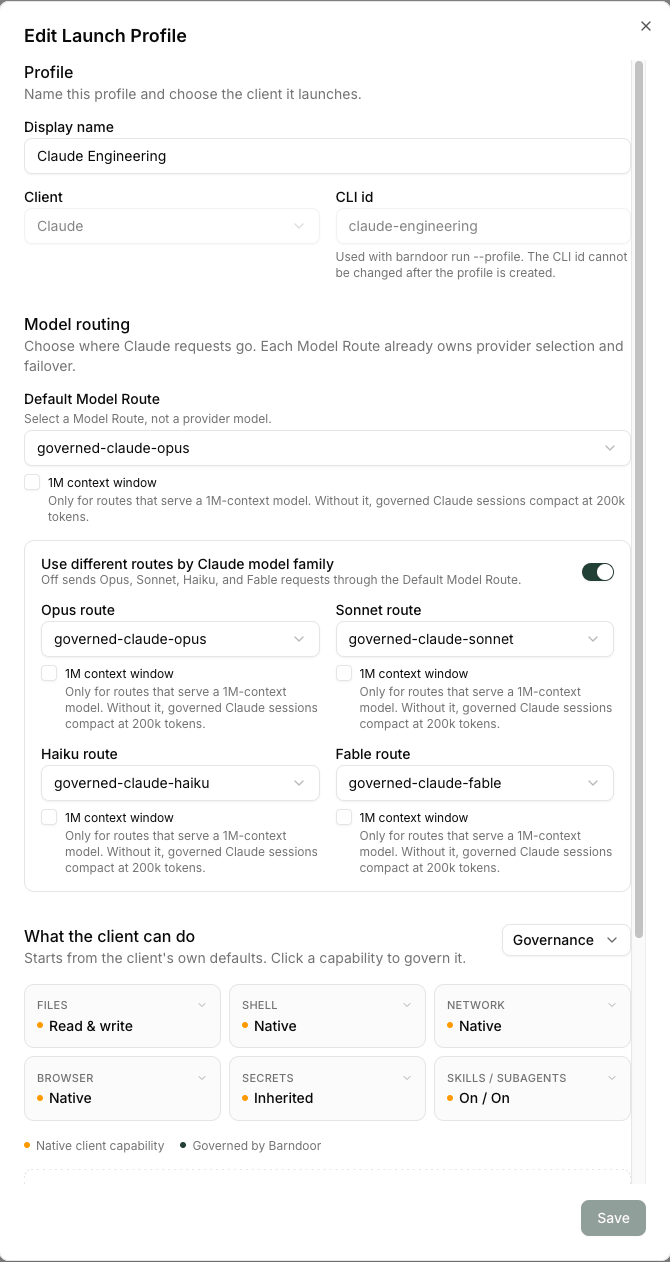
A launch profile decides where a governed Claude session’s requests go. Create one in LLM Management → Launch Profiles with New Launch Profile.
claude-engineering.
Mark one Claude profile as the org default. A launch that names no profile resolves to it; a launch that names a CLI id which does not exist, is inactive, or belongs to a different client is refused.
Two options on that dialog are worth knowing:
- Use different routes by Claude model family. Off sends Opus, Sonnet, Haiku, and Fable through the Default Model Route. On, each family gets its own route, and any family you leave blank uses the Default Model Route.
- 1M context window. Tick this only for a route that serves a 1M-context model. Without it, governed Claude sessions compact at 200k tokens.
Values IT will be asked for
Two of these go into the MDM profiles at render time, and re-rendering later reissues the profiles, so collect them now.
Once those are done, continue to Install with MDM.
Download
The current stable release is a signed, notarized macOS installer on Barndoor’s download host:- Package: https://downloads.barndoor.ai/barndoor-gui/latest/Barndoor.pkg
- Checksum: https://downloads.barndoor.ai/barndoor-gui/latest/Barndoor.pkg.sha256
- MDM kit for IT: https://downloads.barndoor.ai/barndoor-gui/latest/barndoor-mdm-kit.tar.gz
Requirements
- A Mac running a current macOS release.
- Barndoor.app installed by IT, or a one-off
.pkgfor a lab machine. - A Barndoor account in the organization the Mac is pinned to.
- Claude Desktop installed on the Mac. Bridge launches it; it does not install it.
- The organization’s LLM Gateway configured with at least one enabled route for the Claude models your launch profile resolves to. See Before you install.