

Barndoor Bridge is in Early Access. These pages are not listed in the navigation. Overview:
/how-tos/barndoor-bridge/overview · Using Bridge: /how-tos/barndoor-bridge/using-bridge · Install with MDM: /how-tos/barndoor-bridge/install-with-mdmWhat you deploy
The fleet install is a signed.pkg plus a handful of configuration profiles, pushed by Iru or Rippling. Any Apple MDM that accepts custom .mobileconfig profiles and a recurring root script works the same way.
Everything you need is in the MDM kit, a small tarball with the profile templates, the render script, and the updater script:
- https://downloads.barndoor.ai/barndoor-gui/latest/barndoor-mdm-kit.tar.gz
- https://downloads.barndoor.ai/barndoor-gui/latest/barndoor-mdm-kit.tar.gz.sha256
.pkg for every release. The updater script pulls the current stable package from Barndoor’s download host.
The
.pkg also installs a LaunchAgent (ai.barndoor.gui) that starts the app at login without stealing focus. Post-install bootstraps that agent for the current console user so the menu-bar icon appears without waiting for the next login.
What lands on the Mac
Prerequisites
- Macs enrolled in Iru or Rippling. Supervision (Apple Business Manager with Automated Device Enrollment) is required for the login-item lock and the silent Full Disk Access grant. On a user-enrolled or BYOD Mac the package and managed settings still work, but the user sees a permission prompt on first workspace access and can turn the login item off.
- Barndoor’s Apple Team ID,
547SWHX99F. This is Barndoor’s Developer ID team, not your own company’s, because the profiles use it to identify Barndoor’s signed app to macOS. You do not need an Apple Developer account. The updater separately verifies the installer identityDeveloper ID Installer: Barndoor AI, Inc. - Claude Desktop on the same Macs, from your existing software catalog. Bridge launches it; it does not install it.
- (Optional DNS profile) a DNS-over-HTTPS resolver whose blocklist matches the rule above.
1. Render the profiles
Unpack the MDM kit on a Mac. The profile templates inprofiles/ contain placeholders for your organization’s values. Render them once and keep the output. Rendering again mints new profile UUIDs, and MDM treats those as new profiles.
managed-prefs.mobileconfiglogin-item.mobileconfigpppc.mobileconfigdns-inference-block.mobileconfig, only if you passed a resolver URL
--backend-url is the Barndoor API base for your environment (production is https://app.barndoor.ai/api).
Only --team-id is required. --org-hint is your organization slug and renders as an empty string when omitted, which the CLI treats as unset. Before you install says where to find it.
2. Deploy in Iru
Scope everything to a pilot device group first.1
Configuration profiles
Upload each rendered
.mobileconfig as a custom profile and assign it to the group. Deliver managed settings and PPPC before or with the app so the first launch is already configured.2
Updater script
Add
install-latest.sh as a root-level recurring remediation script on the same group.- Audit:
/Applications/Barndoor.app/Contents/MacOS/Barndoor --versionmatches the version in the release manifest. - Remediation: run
install-latest.sh.
3
Optional DNS profile
Configure the resolver blocklist first, then deploy the profile.
Barndoor-<version>.pkg into Iru. The script fetches the current notarized package from downloads.barndoor.ai. No custom Network Extension or restricted entitlement is required.
3. Deploy in Rippling
Rippling is a full Apple MDM and takes the same artifacts. Two Rippling-specific rules:- Scope to devices, not users.
- Upload
.mobileconfigfiles from a Mac. Rippling silently fails those uploads from Windows or Linux.
1
Profiles first
IT → Devices → Policies tab. In the left rail under Library, open macOS library, then Upload ▾ → Custom configuration profile. Name the policy after the payload (for example “Barndoor CLI — Managed Settings”), pick the rendered file, and scope it to the target devices. Repeat for each rendered 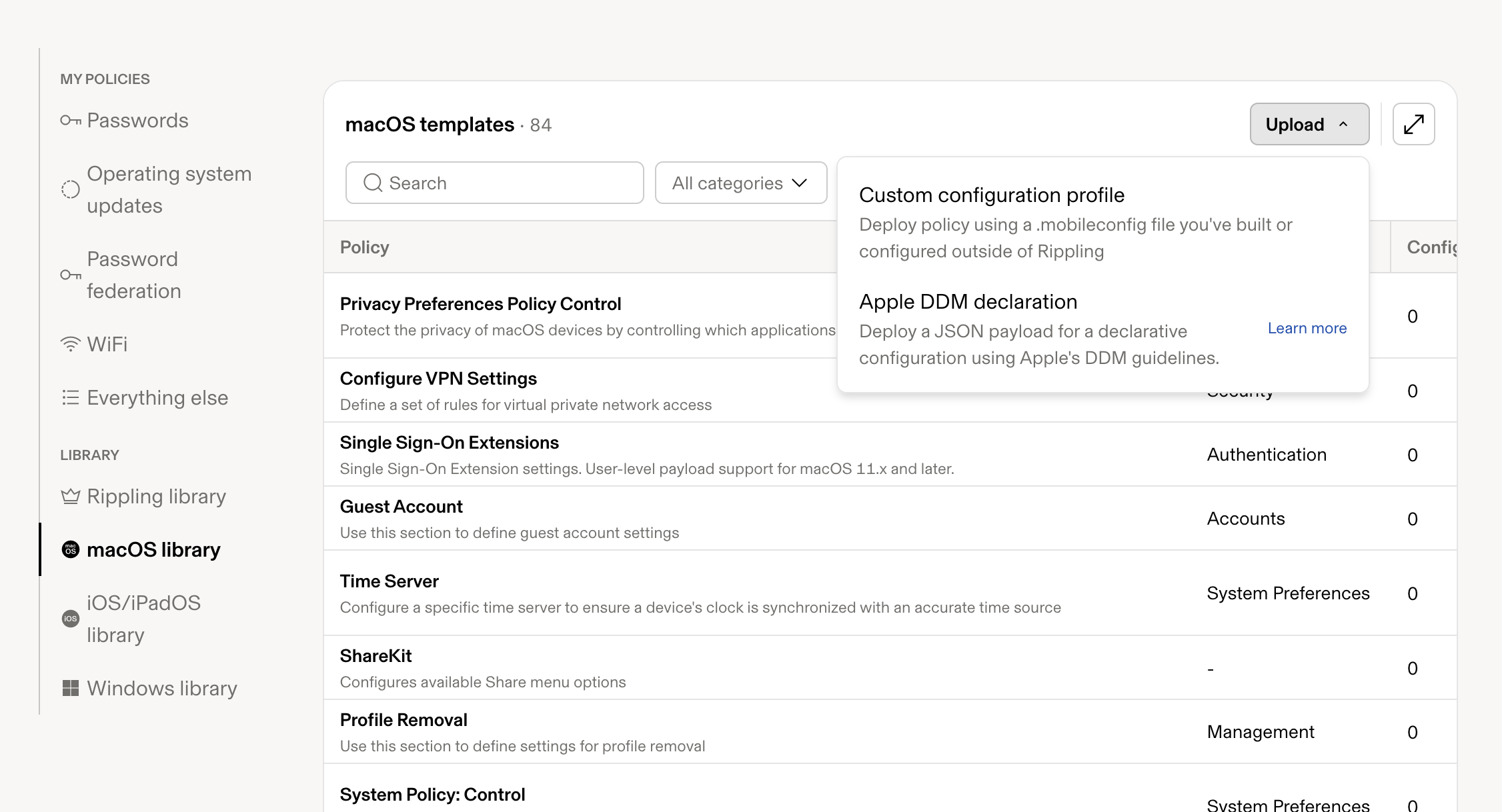
.mobileconfig.2
Then the updater
IT → Devices → Scripts tab: add
install-latest.sh as a root-level recurring macOS script on those devices. It reads the release manifest; you do not upload a .pkg per release.3
Optional DNS profile
Configure the resolver first, then deploy.
.pkg and has no downgrade guard, so a later manual push can roll a Mac back to an older Bridge, and the updater script will then refuse to move it forward. The script is the only update path.
The script’s result in Rippling may show accepted source=Notarized Developer ID under Error. That is the macOS notarization check reporting success on stderr, not a failure; the Output column carries the real result (barndoor-mdm-update: installed <version>).
4. How updates work
Bridge has two release channels. Stable is the default and is what customer fleets follow; it moves only when Barndoor promotes a release. Edge receives every Bridge build and is meant for a small pilot group that wants to see changes before stable. The updater script follows stable as written. MDM consoles run the script body you paste and do not pass arguments, so to put a pilot device group on edge, deploy a second copy of the script to that group with this line near the top changed:downloads.barndoor.ai only after the matching signed, notarized .pkg is available. The updater script:
- accepts only that host
- checks SHA-256, package signature, and Gatekeeper (Barndoor Developer ID Installer)
- refuses to downgrade
- lets the package post-install restart the menu-bar agent
barndoor update and barndoor update-gui refuse with “updates are managed by your organization’s MDM”. That lockout is intended: IT owns the version. Without the profile there is no lockout, so deploy the profile before or with the app. Note that barndoor update never modifies /Applications/Barndoor.app; it installs a separate per-user CLI, which is exactly what the lockout prevents on a managed Mac.
5. Verify a Mac
On an enrolled laptop, after the user has logged into macOS:barndoor doctor shows Present: no, the managed settings profile did not land. Check that the payload domain is exactly ai.barndoor.cli and that the device is in the assigned group.
Unmanaged or lab install
For a single Mac that is not in MDM:- Download and install the current stable package: https://downloads.barndoor.ai/barndoor-gui/latest/Barndoor.pkg. The matching checksum is at the same path with
.sha256appended. - Open Barndoor from Applications and sign in.
- To keep it running at login without MDM, add it under System Settings → General → Login Items. The user can still disable that.
barndoor update-gui can install or upgrade the menu-bar app for developers who already have the CLI. It is not the fleet path, and it is locked out once updates_managed is set.