> ## Documentation Index
> Fetch the complete documentation index at: https://docs.barndoor.ai/llms.txt
> Use this file to discover all available pages before exploring further.
# LLM Gateway Failover for Claude Code
> Route Claude Code through the Barndoor LLM Gateway on your Claude subscription, with automatic failover to a fallback model when you hit a rate limit.
The Barndoor LLM Gateway can sit in front of your Claude Code sessions. Requests
run on your own Claude subscription through the gateway, and when a seat hits its
rate limit the gateway fails the request over to a fallback model you configure.
Developers stay unblocked, and you keep the subscription as the primary, low-cost
path while paying for overflow only when you actually spill.
### How it works
Claude Code talks to the gateway using the Anthropic Messages API. Your Claude
subscription token is forwarded through to Anthropic (OAuth passthrough), so
the request is served on your subscription.
The gateway resolves the model to a route. The highest-priority target is your
Claude subscription.
If Anthropic returns a rate-limit error (HTTP 429), the gateway reroutes the
same request to the next target in the route, such as an open model, with no
action from the developer. The response comes back on the fallback and the
session continues.
### Prerequisites
You need a Barndoor account with admin privileges, the LLM Gateway enabled for
your organization, and an active Claude subscription for the developer using it.
### 1. Configure the providers
In the Barndoor web UI, go to **Admin** > **LLM Management** > **Providers**.
1. Add an **Anthropic** provider and choose the **Claude OAuth** auth method. This
is the passthrough provider: it stores no API key and forwards the caller's
subscription token.
2. Add a **fallback** provider for the model you want to overflow to (for example
an open model on a cloud you already use). Give it whatever credentials that
provider needs.
### 2. Create a route with failover
Go to **Model Routes** and create a route under a single model name (the alias
Claude Code will target). Add two targets, in priority order:
| Priority | Target | Purpose |
| :---------- | :----------------------- | :--------------------------------------------- |
| 1 (highest) | Anthropic (Claude OAuth) | Primary, served on your subscription |
| 2 | Fallback provider | Overflow when the subscription is rate-limited |
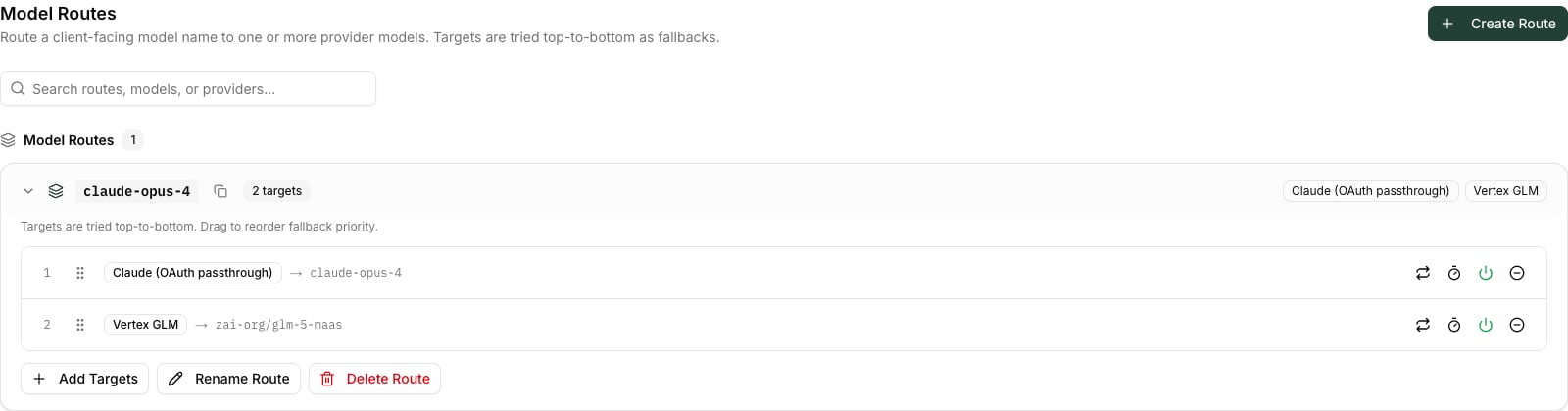 Targets are tried top to bottom. Set the primary's **retry-on-429** count if you
want the gateway to briefly retry the subscription before spilling; leave it at 0
to fail over immediately.
### 3. Create a gateway API key
Go to **API Keys** and create a key. This authenticates Claude Code *to the
gateway*; it is separate from your Claude subscription token, which the gateway
forwards to Anthropic.
### 4. Point Claude Code at the gateway
Stay logged into Claude Code with your Claude subscription so it sends its OAuth
token, then set these environment variables and launch `claude`:
```bash Environment theme={null}
# Do NOT set ANTHROPIC_API_KEY — that switches Claude Code to API-key mode
unset ANTHROPIC_API_KEY
export ANTHROPIC_BASE_URL="https:///api/llm-gateway"
export ANTHROPIC_CUSTOM_HEADERS="x-api-key: "
# Map Claude Code's model slots to your route's alias
export ANTHROPIC_DEFAULT_OPUS_MODEL=""
export ANTHROPIC_DEFAULT_SONNET_MODEL=""
export ANTHROPIC_DEFAULT_HAIKU_MODEL=""
```
The split is the key detail: the **`x-api-key`** header authenticates you to the
gateway, while Claude Code's **`Authorization: Bearer`** subscription token is
what the gateway forwards to Anthropic.
### 5. Verify
Run a normal Claude Code request. It should complete on your subscription. To see
the failover, drive the seat until Anthropic rate-limits it: the gateway logs the
429 and reroutes to the fallback, and the request still returns a completion.
Subscription terms. Provider subscriptions are intended for individual,
interactive use. Route each developer's own seat and keep usage interactive.
Pooling seats behind a shared gateway, or driving them as shared automated
capacity, may violate the provider's terms of service. Review your model
provider's terms before enabling this pattern, especially at scale.
Targets are tried top to bottom. Set the primary's **retry-on-429** count if you
want the gateway to briefly retry the subscription before spilling; leave it at 0
to fail over immediately.
### 3. Create a gateway API key
Go to **API Keys** and create a key. This authenticates Claude Code *to the
gateway*; it is separate from your Claude subscription token, which the gateway
forwards to Anthropic.
### 4. Point Claude Code at the gateway
Stay logged into Claude Code with your Claude subscription so it sends its OAuth
token, then set these environment variables and launch `claude`:
```bash Environment theme={null}
# Do NOT set ANTHROPIC_API_KEY — that switches Claude Code to API-key mode
unset ANTHROPIC_API_KEY
export ANTHROPIC_BASE_URL="https:///api/llm-gateway"
export ANTHROPIC_CUSTOM_HEADERS="x-api-key: "
# Map Claude Code's model slots to your route's alias
export ANTHROPIC_DEFAULT_OPUS_MODEL=""
export ANTHROPIC_DEFAULT_SONNET_MODEL=""
export ANTHROPIC_DEFAULT_HAIKU_MODEL=""
```
The split is the key detail: the **`x-api-key`** header authenticates you to the
gateway, while Claude Code's **`Authorization: Bearer`** subscription token is
what the gateway forwards to Anthropic.
### 5. Verify
Run a normal Claude Code request. It should complete on your subscription. To see
the failover, drive the seat until Anthropic rate-limits it: the gateway logs the
429 and reroutes to the fallback, and the request still returns a completion.
Subscription terms. Provider subscriptions are intended for individual,
interactive use. Route each developer's own seat and keep usage interactive.
Pooling seats behind a shared gateway, or driving them as shared automated
capacity, may violate the provider's terms of service. Review your model
provider's terms before enabling this pattern, especially at scale.