> ## Documentation Index
> Fetch the complete documentation index at: https://docs.barndoor.ai/llms.txt
> Use this file to discover all available pages before exploring further.
# Failover, Cooldowns, and Route Health
> How a model route's ordered targets fail over, which errors trigger it, and how cooldowns and route health keep traffic off failing targets.
A **model route** is a client-facing model name — the value callers put in `model` — backed by one or more **targets**. Each target is one provider model. Targets are tried top to bottom: the gateway sends the request to the first target, and if that target fails in a way another target might not, it sends the same request to the next one. This page explains exactly when that happens and how the gateway keeps traffic away from targets that keep failing. For the most common use of it — running Claude Code on each developer's own Claude subscription, with a fallback model for when they hit their rate limit — see [Get the most out of your Claude subscription](/how-tos/llm-gateway-failover).
You need a Barndoor account with admin privileges and the LLM Gateway enabled for your organization. New to gateway administration? Work through the [Quickstart Guide](/how-tos/llm-gateway-quickstart) first — this page assumes you know your way around **LLM Management**.
## Routes and targets
Routes live under **LLM Management → Model Routes**.
* **Create Route** asks for a **Route Name** (the name users put in API calls) and one or more provider models to add as targets.
* Expand a route to see its targets, numbered in priority order. Drag a target by its handle to change the order. **Add Targets** adds more; the row's actions menu has **Rename route**, **Duplicate route**, and **Delete route**.
* Each target has its own controls on the right of its row:
| Control | What it sets |
| - | - |
| **Rate limit retries** | How many times to retry *this* target when the provider rate-limits the request, before failing over. See [Rate-limit retries](#rate-limit-retries). |
| **Timeouts** | **Request timeout (s)** — the total time a non-streaming request may take (1–600, default 120). **Stream idle (s)** — the longest gap allowed between streamed chunks (1–300, default 180). |
| Power | Disables this target only. The provider keeps serving the model to other routes. |
| Remove | Removes the target from this route. The provider keeps serving the model. |
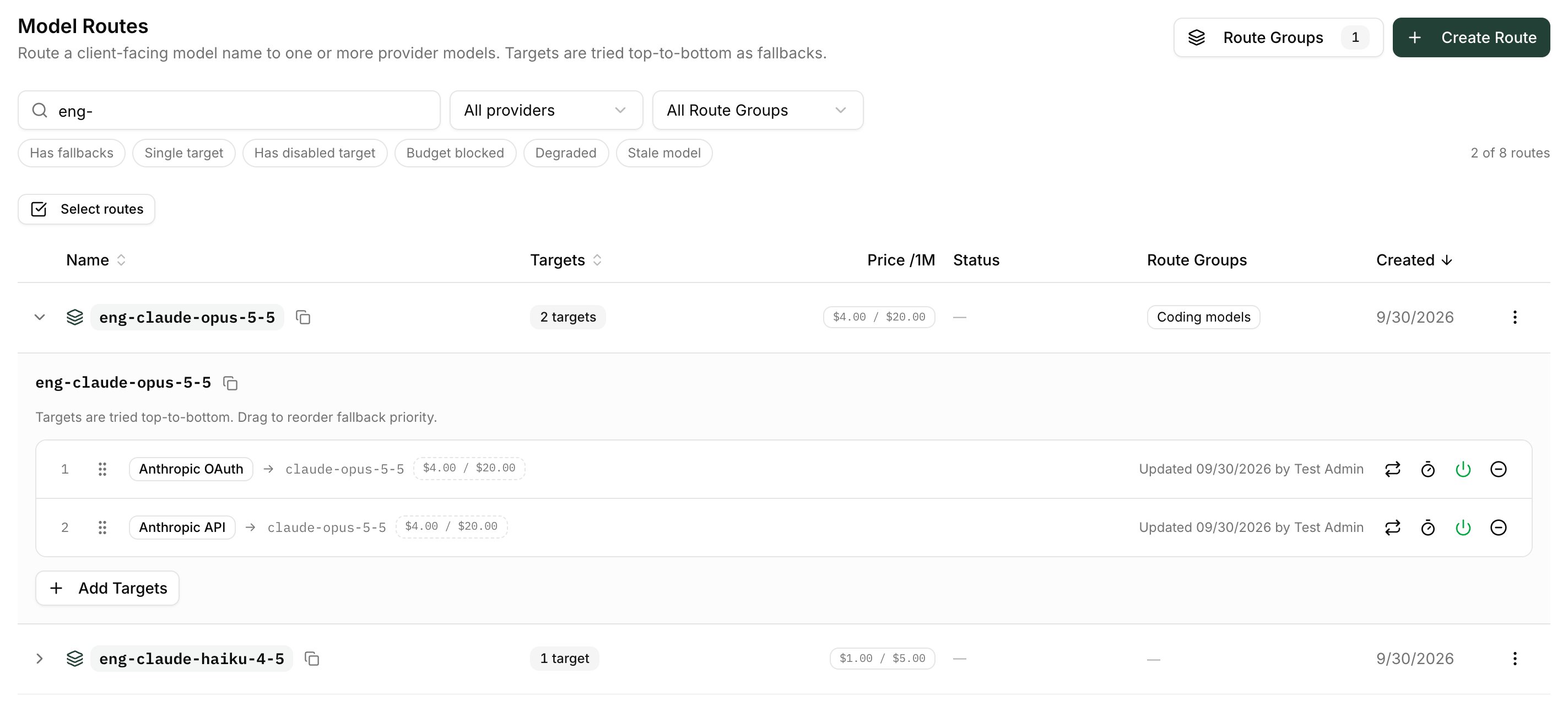 A target that can't serve shows a badge explaining why — for example **Provider disabled**, **Provider model disabled**, **Provider not serving** (the provider is failing its connection health check), a budget-exhausted badge, or a cooldown badge (see [Route health](#route-health-and-cooldowns)). Disabled or blocked targets are skipped; the rest of the route keeps serving.
## When the gateway fails over
The gateway moves on to the next target when the current one fails with an error another provider might not share:
| Upstream result | Fails over? |
| - | - |
| `401` / `403` — credential rejected | Yes |
| `404` — model not available on this provider | Yes |
| `429` — rate limited (after any configured retries) | Yes |
| `400` that says the account's API usage limit has been reached | Yes |
| `5xx`, including Anthropic's `529` overloaded | Yes |
| Timeout, or a connection failure while sending the request | Yes |
| Any other `4xx` (for example a malformed request) | **No** — the next target would reject it too, so the error is returned as is |
| A Barndoor-side refusal (authentication, model access, budget, DLP) | **No** |
| A passthrough target (**Claude OAuth passthrough**) reached without the caller's own Claude sign-in token | **No** — the request fails with `401` rather than trying the next target, so a caller without a subscription token doesn't walk the whole route |
Failover happens before the response starts. Once a target has begun streaming a response back, a later failure in that stream is not replayed on another target.
When every target fails, the caller gets one error that lists each attempt under `error.metadata.attempts`. Its status is:
* `401` if every target was skipped because the caller's own credential was rejected;
* `429`, with `Retry-After`, if every target was rate-limited, out of quota, or cooling down;
* the shared status if every attempt returned the same one;
* otherwise `502`.
Successful responses on `POST /v1/chat/completions` and `POST /v1/messages` carry `x-bd-provider-route-attempt` (which target served it, `1` = first), `x-bd-provider-route-count`, and `x-bd-provider-failover-count`. See [Observability Headers](/how-tos/llm-gateway-quickstart#observability-headers).
### Rate-limit retries
By default a rate-limited target fails over immediately. The **Rate limit retries** popover on each target changes that:
* **Retry count** (0–10) — how many times to retry the same target on a rate limit before failing over. `0` means fail over immediately.
* **Max wait (s)** (0–180) — when set, the gateway waits for the provider's `Retry-After` between retries, up to this many seconds. At `0` it waits about one second between retries and ignores `Retry-After`.
The popover's **Effective behavior** line spells out what the current values do. A target with custom retries shows a small retry-count badge.
## Route health and cooldowns
On top of per-request failover, the gateway tracks the recent results of every target and puts one that keeps failing into a **cooldown**. While a target is cooling down, requests skip it and go straight to the next target, rather than paying for a failed attempt first.
Health is tracked per **provider and upstream model**, not per route. Two routes that both use `claude-opus-5-5` on the same provider share one health record, so a cooldown triggered through one route applies to both.
### What starts a cooldown
| Trigger | Default cooldown |
| - | - |
| **10 failures within 60 seconds** — `5xx`, timeouts, connection failures, and `401`/`403` on a provider with a stored key. Successes in between don't reset the count. | 30 seconds, doubling each time the target fails again on recovery, up to 300 seconds |
| **A single `429`** | The provider's `Retry-After`, or 30 seconds if it sent none; never longer than 300 seconds |
| **A single `529` overloaded** | The provider's `Retry-After`, or 10 seconds. Doesn't count toward the failure threshold and doesn't escalate. |
| **A single "API usage limit reached" `400`** | 300 seconds (the longest cooldown allowed) |
Other `4xx` responses, including `404`, never start a cooldown — the provider answered, it just refused that request.
When a cooldown expires, the target is *recovering*: the gateway lets a few requests through (three at a time) to test it. After three successes it is healthy again. If a test request fails, the target cools down again — for server failures, for twice as long as last time.
### Passthrough providers cool down per user
On a provider using **Claude OAuth passthrough** or **ChatGPT OAuth passthrough**, each request carries the caller's own subscription token. A `429` or usage-limit `400` there is that one person's quota, and a `401`/`403` is that one person's token. So those errors cool down **only that caller's credential**; the target stays healthy for everyone else. A rejected token cools down for the longest window (300 seconds by default), because it won't fix itself — the user needs to sign in again.
Server errors, timeouts, and `529` overloaded responses still cool the target for everyone, since they aren't about any one person's credential.
### Seeing it in the portal
In **Model Routes**, a target in cooldown shows a badge; hover it for the reason and when it recovers:
| Badge | Meaning |
| - | - |
| **Temporarily unavailable** | Cooling down for everyone |
| **Recovering** | Cooldown expired; test requests are being let through |
| **Unavailable for you** / **Recovering for you** | Cooling down only for your own credential |
| **Reconnect required** | The provider rejected your own credential; sign in again |
A collapsed route shows **N of M available** when some of its targets are cooling down, or **Temporarily unavailable** when all of them are. Users see the same badges on their own models under **Settings → My Models**.
### Custom cooldown policies
The thresholds above are per-target defaults. A target whose cooldown policy differs from the defaults shows a **Custom cooldown** badge; its tooltip lists every value, with the non-default ones in bold:
| Tooltip row | Default | Notes |
| - | - | - |
| **Failures to cool down** | 10 | `0` turns off cooldowns for everyone on this target |
| **Failure window** | 60s | |
| **First cooldown** | 30s | Doubles on each failed recovery |
| **Longest cooldown** | 300s | Caps every other window |
| **Rate-limited (429) cooldown** | 30s | Used when the provider sends no `Retry-After` |
| **Overloaded (529) cooldown** | 10s | `0` counts a `529` as an ordinary failure instead |
Cooldown policies are changed through the admin API (the cooldown fields on [Create a model route](/api-reference/llm-gateway/model-routes/createRoute) and [Update a model route](/api-reference/llm-gateway/model-routes/updateRoute)), not in the portal. The Terraform provider does not expose them yet. Because routes to the same upstream model share one health record, each route judges that shared record against its own policy.
### Clearing a cooldown
Cooldowns clear on their own: once the window passes, the gateway sends recovery probes and returns the target to service when they succeed. There is no manual reset in the portal — if you need a target back in service sooner (for example, right after fixing a provider-side outage), contact Barndoor support.
## Route groups
A **Route Group** is a named set of model routes that a [model access policy](/how-tos/use-llm-controls) can target as a whole — for example "Engineering" — instead of listing every route and editing the policy whenever a route is added.
* Open **Model Routes → Route Groups** to create, rename, or delete groups and choose their routes.
* Add routes to a group from a route's actions menu, or select several routes and add them in bulk.
* A route can belong to several groups. The **Route Groups** column and filter on the routes list show membership.
A group contains whole routes, not individual targets. Like every model access target, a group grants nothing on its own: it narrows an allowlist or blocks through a denylist. Deleting a route removes it from its groups automatically.
Renaming a route doesn't always carry its group memberships over. If the route's targets are also the models' enablement on their providers — typically when the route name matches the upstream model name, such as `claude-opus-5-5` → `claude-opus-5-5` — the renamed route drops out of its groups, and any model access policy that targets those groups stops covering it. After renaming, check the **Route Groups** column and re-add the route if it's missing. Budgets and rate limits whose **Target** is the old route name also keep the old name, so update them too.
## Related
* [Get the most out of your Claude subscription](/how-tos/llm-gateway-failover) — a worked example: each developer's own Claude seat as the primary target, with automatic overflow to a fallback model.
* [Routing policies](/how-tos/llm-routing-policies) — choose the model per request instead of always starting at the first target.
* [LLM Controls](/how-tos/use-llm-controls) — budgets, rate limits, and model access, including how target-bound budgets make a route fail over.
This documentation is built and hosted on [Mintlify](https://mintlify.com), a developer documentation platform.
A target that can't serve shows a badge explaining why — for example **Provider disabled**, **Provider model disabled**, **Provider not serving** (the provider is failing its connection health check), a budget-exhausted badge, or a cooldown badge (see [Route health](#route-health-and-cooldowns)). Disabled or blocked targets are skipped; the rest of the route keeps serving.
## When the gateway fails over
The gateway moves on to the next target when the current one fails with an error another provider might not share:
| Upstream result | Fails over? |
| - | - |
| `401` / `403` — credential rejected | Yes |
| `404` — model not available on this provider | Yes |
| `429` — rate limited (after any configured retries) | Yes |
| `400` that says the account's API usage limit has been reached | Yes |
| `5xx`, including Anthropic's `529` overloaded | Yes |
| Timeout, or a connection failure while sending the request | Yes |
| Any other `4xx` (for example a malformed request) | **No** — the next target would reject it too, so the error is returned as is |
| A Barndoor-side refusal (authentication, model access, budget, DLP) | **No** |
| A passthrough target (**Claude OAuth passthrough**) reached without the caller's own Claude sign-in token | **No** — the request fails with `401` rather than trying the next target, so a caller without a subscription token doesn't walk the whole route |
Failover happens before the response starts. Once a target has begun streaming a response back, a later failure in that stream is not replayed on another target.
When every target fails, the caller gets one error that lists each attempt under `error.metadata.attempts`. Its status is:
* `401` if every target was skipped because the caller's own credential was rejected;
* `429`, with `Retry-After`, if every target was rate-limited, out of quota, or cooling down;
* the shared status if every attempt returned the same one;
* otherwise `502`.
Successful responses on `POST /v1/chat/completions` and `POST /v1/messages` carry `x-bd-provider-route-attempt` (which target served it, `1` = first), `x-bd-provider-route-count`, and `x-bd-provider-failover-count`. See [Observability Headers](/how-tos/llm-gateway-quickstart#observability-headers).
### Rate-limit retries
By default a rate-limited target fails over immediately. The **Rate limit retries** popover on each target changes that:
* **Retry count** (0–10) — how many times to retry the same target on a rate limit before failing over. `0` means fail over immediately.
* **Max wait (s)** (0–180) — when set, the gateway waits for the provider's `Retry-After` between retries, up to this many seconds. At `0` it waits about one second between retries and ignores `Retry-After`.
The popover's **Effective behavior** line spells out what the current values do. A target with custom retries shows a small retry-count badge.
## Route health and cooldowns
On top of per-request failover, the gateway tracks the recent results of every target and puts one that keeps failing into a **cooldown**. While a target is cooling down, requests skip it and go straight to the next target, rather than paying for a failed attempt first.
Health is tracked per **provider and upstream model**, not per route. Two routes that both use `claude-opus-5-5` on the same provider share one health record, so a cooldown triggered through one route applies to both.
### What starts a cooldown
| Trigger | Default cooldown |
| - | - |
| **10 failures within 60 seconds** — `5xx`, timeouts, connection failures, and `401`/`403` on a provider with a stored key. Successes in between don't reset the count. | 30 seconds, doubling each time the target fails again on recovery, up to 300 seconds |
| **A single `429`** | The provider's `Retry-After`, or 30 seconds if it sent none; never longer than 300 seconds |
| **A single `529` overloaded** | The provider's `Retry-After`, or 10 seconds. Doesn't count toward the failure threshold and doesn't escalate. |
| **A single "API usage limit reached" `400`** | 300 seconds (the longest cooldown allowed) |
Other `4xx` responses, including `404`, never start a cooldown — the provider answered, it just refused that request.
When a cooldown expires, the target is *recovering*: the gateway lets a few requests through (three at a time) to test it. After three successes it is healthy again. If a test request fails, the target cools down again — for server failures, for twice as long as last time.
### Passthrough providers cool down per user
On a provider using **Claude OAuth passthrough** or **ChatGPT OAuth passthrough**, each request carries the caller's own subscription token. A `429` or usage-limit `400` there is that one person's quota, and a `401`/`403` is that one person's token. So those errors cool down **only that caller's credential**; the target stays healthy for everyone else. A rejected token cools down for the longest window (300 seconds by default), because it won't fix itself — the user needs to sign in again.
Server errors, timeouts, and `529` overloaded responses still cool the target for everyone, since they aren't about any one person's credential.
### Seeing it in the portal
In **Model Routes**, a target in cooldown shows a badge; hover it for the reason and when it recovers:
| Badge | Meaning |
| - | - |
| **Temporarily unavailable** | Cooling down for everyone |
| **Recovering** | Cooldown expired; test requests are being let through |
| **Unavailable for you** / **Recovering for you** | Cooling down only for your own credential |
| **Reconnect required** | The provider rejected your own credential; sign in again |
A collapsed route shows **N of M available** when some of its targets are cooling down, or **Temporarily unavailable** when all of them are. Users see the same badges on their own models under **Settings → My Models**.
### Custom cooldown policies
The thresholds above are per-target defaults. A target whose cooldown policy differs from the defaults shows a **Custom cooldown** badge; its tooltip lists every value, with the non-default ones in bold:
| Tooltip row | Default | Notes |
| - | - | - |
| **Failures to cool down** | 10 | `0` turns off cooldowns for everyone on this target |
| **Failure window** | 60s | |
| **First cooldown** | 30s | Doubles on each failed recovery |
| **Longest cooldown** | 300s | Caps every other window |
| **Rate-limited (429) cooldown** | 30s | Used when the provider sends no `Retry-After` |
| **Overloaded (529) cooldown** | 10s | `0` counts a `529` as an ordinary failure instead |
Cooldown policies are changed through the admin API (the cooldown fields on [Create a model route](/api-reference/llm-gateway/model-routes/createRoute) and [Update a model route](/api-reference/llm-gateway/model-routes/updateRoute)), not in the portal. The Terraform provider does not expose them yet. Because routes to the same upstream model share one health record, each route judges that shared record against its own policy.
### Clearing a cooldown
Cooldowns clear on their own: once the window passes, the gateway sends recovery probes and returns the target to service when they succeed. There is no manual reset in the portal — if you need a target back in service sooner (for example, right after fixing a provider-side outage), contact Barndoor support.
## Route groups
A **Route Group** is a named set of model routes that a [model access policy](/how-tos/use-llm-controls) can target as a whole — for example "Engineering" — instead of listing every route and editing the policy whenever a route is added.
* Open **Model Routes → Route Groups** to create, rename, or delete groups and choose their routes.
* Add routes to a group from a route's actions menu, or select several routes and add them in bulk.
* A route can belong to several groups. The **Route Groups** column and filter on the routes list show membership.
A group contains whole routes, not individual targets. Like every model access target, a group grants nothing on its own: it narrows an allowlist or blocks through a denylist. Deleting a route removes it from its groups automatically.
Renaming a route doesn't always carry its group memberships over. If the route's targets are also the models' enablement on their providers — typically when the route name matches the upstream model name, such as `claude-opus-5-5` → `claude-opus-5-5` — the renamed route drops out of its groups, and any model access policy that targets those groups stops covering it. After renaming, check the **Route Groups** column and re-add the route if it's missing. Budgets and rate limits whose **Target** is the old route name also keep the old name, so update them too.
## Related
* [Get the most out of your Claude subscription](/how-tos/llm-gateway-failover) — a worked example: each developer's own Claude seat as the primary target, with automatic overflow to a fallback model.
* [Routing policies](/how-tos/llm-routing-policies) — choose the model per request instead of always starting at the first target.
* [LLM Controls](/how-tos/use-llm-controls) — budgets, rate limits, and model access, including how target-bound budgets make a route fail over.
This documentation is built and hosted on [Mintlify](https://mintlify.com), a developer documentation platform.