> ## Documentation Index
> Fetch the complete documentation index at: https://docs.barndoor.ai/llms.txt
> Use this file to discover all available pages before exploring further.
# MCP Policies
> Govern enforcement on MCP tool calls — the structured requests and responses between AI agents and connected servers.
An **MCP Policy** governs what happens when a protection profile's detections fire on **MCP tool calls** — the structured requests and responses that flow between AI agents and connected servers (Salesforce, ticketing systems, internal APIs, and so on).
At least one [Protection Profile](/how-tos/data-control-center/protection-profiles) must exist before you can create an MCP policy.
## View your MCP policies
Navigate to **Data Control Center → MCP Policies**.
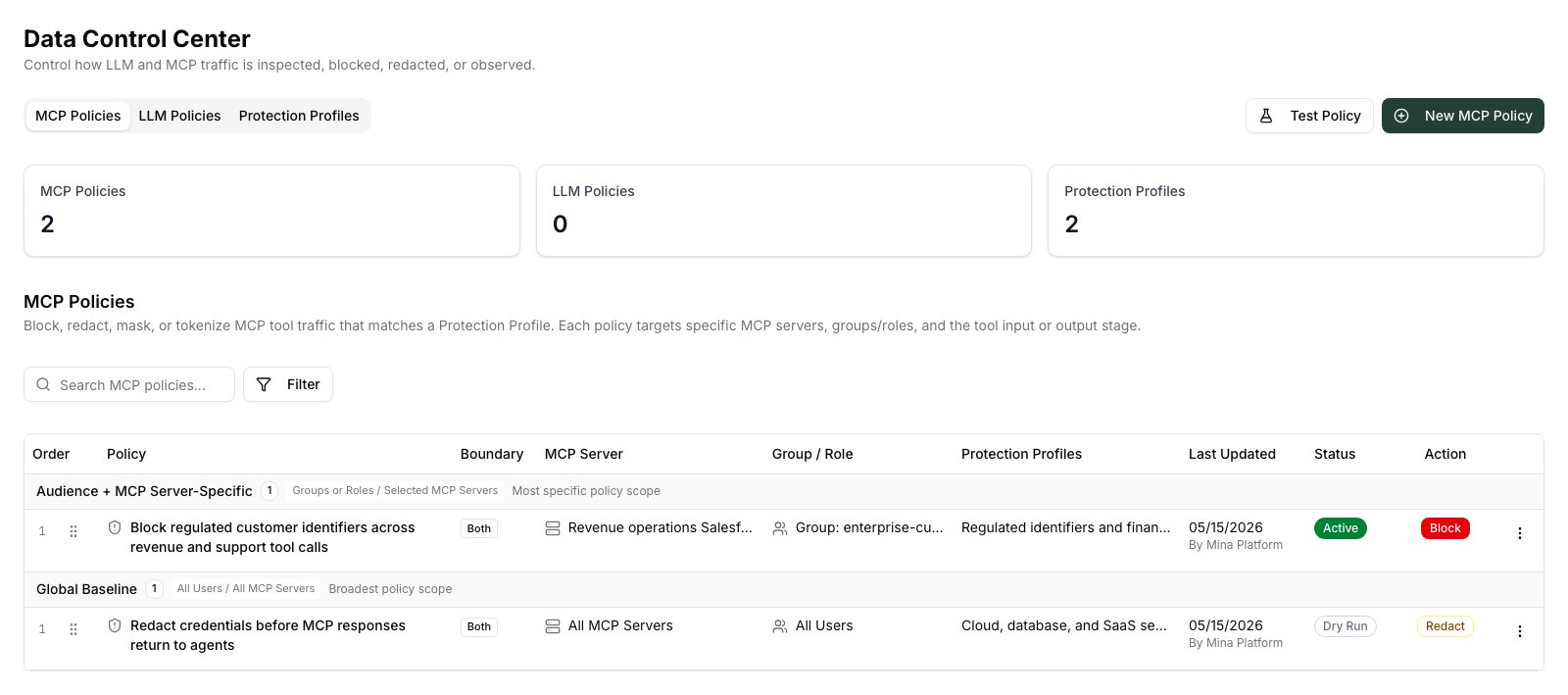 The policy list shows each policy with:
* **Order** / **Priority** — policies run in priority order; lower numbers run first
* **Policy name**
* **MCP Server** — which server(s) this policy targets
* **Audience** — which groups or roles it scopes to (blank = everyone)
* **Protection Profiles** — the detection engines attached
* **Last Updated** — who changed it and when
* **Status** — Active or Dry Run
* **Action** — Block, Redact, Alert Only, etc.
Policies are grouped by their audience scope: **All Users** (unscoped) and **Audience-Specific** (scoped to groups or roles).
## Create a policy
1. Click **New policy** at the top of the MCP Policies tab.
2. **Name** — enter a clear, descriptive name that captures what the policy protects and why. For example:
* *Block regulated customer identifiers across revenue and support tool calls*
* *Redact credentials before MCP responses return to agents*
3. **MCP Server** — choose the server this policy applies to. You can also select **All Servers** to apply the policy globally.
Once the policy is saved, the MCP server cannot be changed. To target a different server, create a new policy.
4. **Protection Profiles** — select one or more profiles to run. All selected profiles run in parallel on matching traffic.
5. **Action** — choose what to do when any detection fires:
| Action | Effect |
| ---------- | ------------------------------------------------------- |
| Block | Rejects the request or response entirely |
| Redact | Replaces detected spans with typed placeholders |
| Tokenize | Replaces detected spans with reversible tokens |
| Alert Only | Logs the detection and passes traffic through unchanged |
| Bypass | Explicitly exempts this traffic from enforcement |
6. **Scope (optional)** — add groups or roles to restrict who this policy applies to. Leave blank to apply the policy to everyone.
7. **Dry run** — toggle on to observe detections without enforcing the action. Useful for validating a policy before activating it.
8. Click **Save**.
## Edit a policy
1. Find the policy in the list.
2. Click **⋮ → Edit** on the policy row.
3. Update any field except the MCP Server.
4. Save the changes. The updated policy takes effect within seconds.
## Change policy priority
Policies run in priority order — lower numbers run first. When multiple policies match the same traffic, the first matching policy's action is applied.
To change priority, drag a policy row up or down using the **⠿** drag handle on the left. The updated order saves immediately.
## Delete a policy
1. Click **⋮ → Delete** on the policy row.
2. Confirm the deletion.
Deleted policies are removed immediately and stop enforcing. Historical detection events attributed to the policy remain in the audit log.
## Test a policy
### Using dry run
Enable **Dry run** on the policy before activating it. In dry run mode the policy evaluates traffic and logs detection events but does not block or modify anything. After a few minutes of real traffic, check **Detection Activity** to see what the policy would have caught.
When you are satisfied with the coverage, edit the policy and disable dry run to activate enforcement.
### Using the Test Workbench
For controlled testing without live traffic:
1. Navigate to **Data Control Center → Test**.
2. Choose the **MCP** mode and select the server and tool to simulate.
3. Paste a sample tool payload.
4. Run the test and review which policies matched, which detection types fired, and what the redacted output would look like.
### Verifying in the Audit Center
After a policy has been active for some time:
1. Navigate to **Audit Center** from the main navigation.
2. Filter by **Event type → Data Protection** to see policy enforcement events.
3. Each event shows the policy name, detection type, action taken, the tool call involved, and the principal context.
To see all enforcement activity for a specific policy, click the policy name in the audit log — it links directly to the policy configuration.
## Common patterns
**Global block on secrets across all MCP traffic:**
* Server: All Servers
* Profiles: Your secrets detection profile
* Action: Block
* Scope: (none — applies to everyone)
**Audit-only monitoring for a new integration:**
* Server: the new integration's MCP server
* Profiles: your PII and secrets profiles
* Action: Alert Only
* Dry run: on (initially)
* Promote to active enforcement after reviewing activity logs
**Scope a strict policy to a high-sensitivity team:**
* Server: Revenue Ops Salesforce
* Profiles: Regulated identifiers profile
* Action: Block
* Scope: Group `enterprise-customer-success-managers`
A separate, less-restrictive policy for the same server (scoped to everyone else) can use Alert Only — the stricter scoped policy runs first for matching principals.
The policy list shows each policy with:
* **Order** / **Priority** — policies run in priority order; lower numbers run first
* **Policy name**
* **MCP Server** — which server(s) this policy targets
* **Audience** — which groups or roles it scopes to (blank = everyone)
* **Protection Profiles** — the detection engines attached
* **Last Updated** — who changed it and when
* **Status** — Active or Dry Run
* **Action** — Block, Redact, Alert Only, etc.
Policies are grouped by their audience scope: **All Users** (unscoped) and **Audience-Specific** (scoped to groups or roles).
## Create a policy
1. Click **New policy** at the top of the MCP Policies tab.
2. **Name** — enter a clear, descriptive name that captures what the policy protects and why. For example:
* *Block regulated customer identifiers across revenue and support tool calls*
* *Redact credentials before MCP responses return to agents*
3. **MCP Server** — choose the server this policy applies to. You can also select **All Servers** to apply the policy globally.
Once the policy is saved, the MCP server cannot be changed. To target a different server, create a new policy.
4. **Protection Profiles** — select one or more profiles to run. All selected profiles run in parallel on matching traffic.
5. **Action** — choose what to do when any detection fires:
| Action | Effect |
| ---------- | ------------------------------------------------------- |
| Block | Rejects the request or response entirely |
| Redact | Replaces detected spans with typed placeholders |
| Tokenize | Replaces detected spans with reversible tokens |
| Alert Only | Logs the detection and passes traffic through unchanged |
| Bypass | Explicitly exempts this traffic from enforcement |
6. **Scope (optional)** — add groups or roles to restrict who this policy applies to. Leave blank to apply the policy to everyone.
7. **Dry run** — toggle on to observe detections without enforcing the action. Useful for validating a policy before activating it.
8. Click **Save**.
## Edit a policy
1. Find the policy in the list.
2. Click **⋮ → Edit** on the policy row.
3. Update any field except the MCP Server.
4. Save the changes. The updated policy takes effect within seconds.
## Change policy priority
Policies run in priority order — lower numbers run first. When multiple policies match the same traffic, the first matching policy's action is applied.
To change priority, drag a policy row up or down using the **⠿** drag handle on the left. The updated order saves immediately.
## Delete a policy
1. Click **⋮ → Delete** on the policy row.
2. Confirm the deletion.
Deleted policies are removed immediately and stop enforcing. Historical detection events attributed to the policy remain in the audit log.
## Test a policy
### Using dry run
Enable **Dry run** on the policy before activating it. In dry run mode the policy evaluates traffic and logs detection events but does not block or modify anything. After a few minutes of real traffic, check **Detection Activity** to see what the policy would have caught.
When you are satisfied with the coverage, edit the policy and disable dry run to activate enforcement.
### Using the Test Workbench
For controlled testing without live traffic:
1. Navigate to **Data Control Center → Test**.
2. Choose the **MCP** mode and select the server and tool to simulate.
3. Paste a sample tool payload.
4. Run the test and review which policies matched, which detection types fired, and what the redacted output would look like.
### Verifying in the Audit Center
After a policy has been active for some time:
1. Navigate to **Audit Center** from the main navigation.
2. Filter by **Event type → Data Protection** to see policy enforcement events.
3. Each event shows the policy name, detection type, action taken, the tool call involved, and the principal context.
To see all enforcement activity for a specific policy, click the policy name in the audit log — it links directly to the policy configuration.
## Common patterns
**Global block on secrets across all MCP traffic:**
* Server: All Servers
* Profiles: Your secrets detection profile
* Action: Block
* Scope: (none — applies to everyone)
**Audit-only monitoring for a new integration:**
* Server: the new integration's MCP server
* Profiles: your PII and secrets profiles
* Action: Alert Only
* Dry run: on (initially)
* Promote to active enforcement after reviewing activity logs
**Scope a strict policy to a high-sensitivity team:**
* Server: Revenue Ops Salesforce
* Profiles: Regulated identifiers profile
* Action: Block
* Scope: Group `enterprise-customer-success-managers`
A separate, less-restrictive policy for the same server (scoped to everyone else) can use Alert Only — the stricter scoped policy runs first for matching principals.